How to make better photos with your phone
I was scrolling Reddit and found a tattoo artist frustrated about low engagement. The tattoo they posted was actually great. Clean lines, solid design.
But the photo was killing it.
The tattoo looked like a random element in the frame. Bad angle, messy background, blown-out skin from glare. You had to squint to appreciate the work.
Here’s the truth: people judge your photo before they judge your tattoo.
And no, you don’t need a fancy camera. Just a few simple fixes that make a big difference fast.
1. Make the tattoo the only thing in the frame
Point and shoot isn’t good enough. Your tattoo ends up competing with clutter, stray limbs, or half a chair.
Fill the frame. Get close.
Cut out everything that isn’t the tattoo or clean skin. If something’s in the shot that doesn’t belong, move it.
Simple rule: if it’s not adding to the photo, it’s taking away from it.
Turn on your camera grid and make sure your tattoo is in the center.
2. Get your angle right
Keep the tattoo flat and parallel to your lens. Forearm tattoo? Hold the phone level with the forearm.
Not above it. Not tilted. Straight on.
Distortion kills detail. Even a slight angle makes clean lines look warped and proportions look wrong.
Always shoot in the tattoo’s natural resting position.
That’s how you designed it. That’s how it reads best.
3. Light is everything. Glare is your enemy.
Fresh tattoos are shiny. That sheen catches light and blows out your photo, hiding lines and washing out color.
You want soft, diffused light. Turn off the flash. Always.
A window on an overcast day is one of the best free setups you have: flat, even, no harsh shadows.
4. Gear that actually helps
You don’t need a studio. Two cheap accessories will upgrade your photos more than any camera ever would.
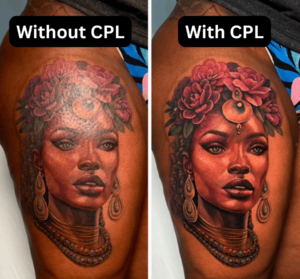
Clip-on polarized lens cuts glare on fresh skin. That shiny, washed-out look disappears. It looks like magic the first time you use it. (Amazon)
Clip-on selfie light gives you soft, even light right where you need it. Ring lights can work too, but they’re often too harsh on fresh skin. The clip-on is gentler and easier to control. (Amazon)
Full tattoo photography kit bundles the polarized lens, clip-on light, and extras together. (Amazon)
5. Watch the redness
Redness in a photo makes clean work look rough or unfinished, even when the tattoo is perfect.
Whenever you can, wait. Even 10 to 15 minutes lets the skin calm down noticeably. Wipe it clean, let it settle, then shoot.
Witch hazel (Amazon) and Bactine (Amazon) are popular options to help reduce redness before the photo.
If redness still shows up, drop the red saturation slightly in your phone’s editing tools. Don’t overdo it. Just enough to let the tattoo breathe.
Now I’m curious: how are your photos looking?
Send me your Instagram and I’ll take a look. Hit reply and drop the link.